How to Restart FireStick to Fix Buffering Issues (Quick Guide)
Alex
How to Restart FireStick to Fix Buffering Issues (Quick Guide)
How to Restart FireStick to Fix Buffering Issues (Quick Guide) How to Restart FireStick to Fix Buffering Issues (Quick Guide) Last updated: May 2025
Experiencing buffering while watching your favorite show on FireStick? You're not alone. Sometimes, a simple restart is all your device needs to restore smooth playback.
Restarting your FireStick helps by clearing app cache, deleting unnecessary temporary files, and resolving minor bugs that may be causing lag or buffering.
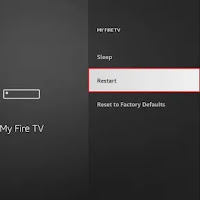
🚀 Why Restarting Fixes FireStick Buffering Clears app cache: Removes junk data stored by apps that may slow down the system. Frees up memory: Ends unnecessary background processes and releases RAM. Fixes temporary bugs: Resolves glitches that affect streaming quality. 🔧 Steps to Restart Your FireStick Follow these easy steps to reboot your FireStick device: From your FireStick home screen, click the Settings (Gear icon) located on the right. Scroll and select My Fire TV from the settings menu. Choose the op…